
Programing oriented documents – JupyterHub
Two decades ago, a project was started to aid the programming-oriented community during their studies and work alike. Over the years the IPython program developed into a complete ecosystem with multiple applications and widespread programming language support under the Jupyter name.
Nowadays informatics is present from primary schools, and it became difficult to find jobs without the need of some level computer literacy. Although the students are more exposed to IT compared to previous generations learning programming offers numerous challenges for the beginners. Despite the effort to make programming available for everyone the subject is among the more difficult ones. Even the first abstract concepts may cause challenges. Good quality teaching materials and notes are desired by both parties to ease and improve the learning process. The research on this field helps to streamline and deepen the learning process by evaluating the learning habits and observing the usage of the newly implemented platform.

Project Jupyter
Project Jupyter started as the successor of the notebook interface parts of the IPython (Interactive Python) platform. IPython was originally developed as a command shell for interactive computing environment but over the years as the project got more attention, the developers decided to move some functionality under a new name thus creating a clearer distinction among the solutions. At the time of the research IPython was more like a background service providing the Python shell and kernel for Jupyter Notebook and JupyterLab.
JupyterLab
JupyterLab is a newer version of the classic Jupyter Notebook. Added features like better handling of .csv files, multiple windows and other improvement make it faveorable over the original application.
JupyterHub
JupyterHub is a server solution for Jupyter Notebooks. It allows multiple users to work in exactly the same programming environment, use the same libraries while the hosting organization has complete complete control, including accessibility.
Jupyter Notebook
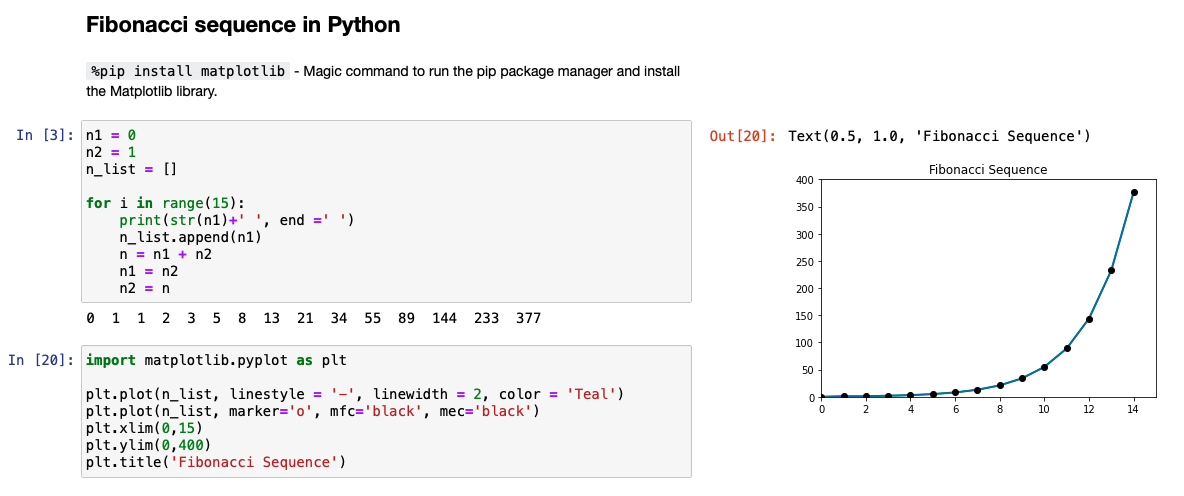
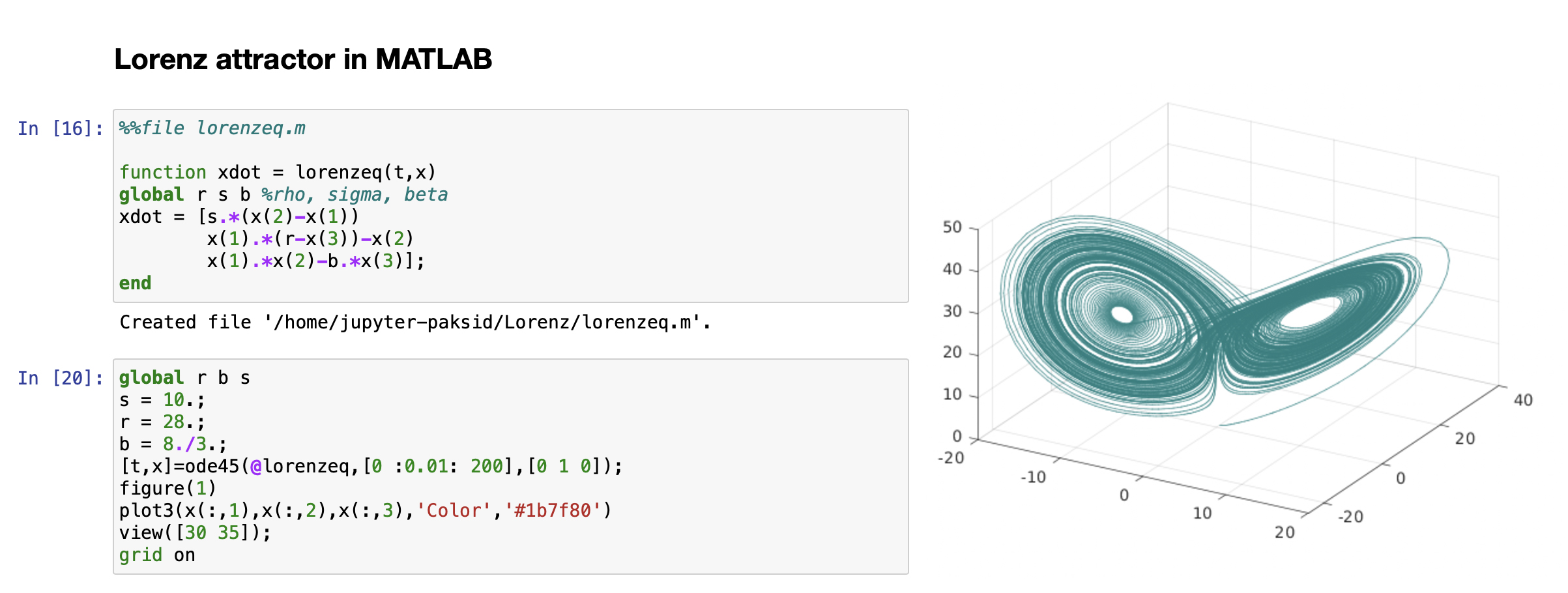
Jupyter Notebook is a web-based interactive computational environment and as the name suggests it is for creating programming-oriented documents. It is capable of running codes, displaying visualisations and handling markdown text in one place. To achieve this, they use their own .ipynb file type, which nowadays is supported by many popular IDEs (integrated developer environments). The application supports Python, Julia, R languages out of the box, but the functionality can be further expanded by installing additional kernels (programming languages), which we previously prepared and tested. JupyterLab includes all functionality of Jupyter Notebook, adds a modular interface to create experience similar to IDEs and the possibility to install extensions. Furthermore, added features like better handling of .csv files and other improvements make it favourable.
Voilá
Voilá is a tool to create web applications from notebooks. It offers an easier and safer way to communicate findings directly from the notebooks by saving the outputs in advance and hiding the code cells if needed. This way the creator can create an interactive and customizable dashboard for online sharing.
Jupyter kernels
The installed kernels determine what languages are available to run in the created notebooks. The list of Jupyter and JupyterHub kernels is constantly growing and enables more and more languages to be accessible in this environment.
The interface and features
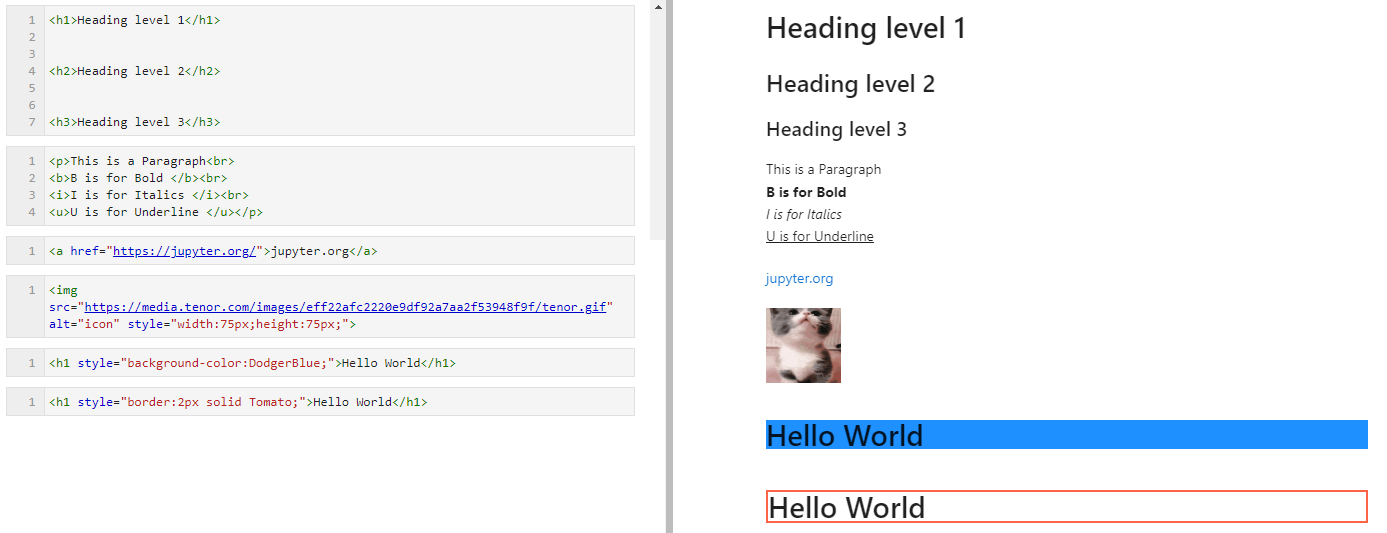
JupyterLab clean and starts with a file browser where the user can create new notebooks at the specified location or open already existing notebooks. The default supported programming language is Python and the necessary files are maintained officially. Upon creating a new empty notebook, the editor initializes, and a new term is introduced to the user. The notebooks are consisting of cells which may contain either text or executable code. In Python, the code cells may rely on each other, e.g.: a variable defined in a top cell can be used and even changed in later code cells. To format and highlight important information, Jupyter notebook uses markdown language. This feature helps to store the explanation or relevant information in a structured way by the use of the basic markdown syntax. In addition, users can insert hyperlinks, images or even gifs to their notes.
Related articles
JOURNAL ARTICLE: Bolstering deep learning with methods and platforms for teaching programming
Márk Csóka, Dávid Paksi, Krisztina Czakóová: Bolstering deep learning with methods and platforms for teaching programming AD ALTA : journal of interdisciplinary research vol 12. issue 2 pp. 308-313, 2022 ISSN [...]
CONFERENCE PAPER: Jupyterhub as a higher education teaching platform
D. Paksi, M. Csóka: Jupyterhub as a higher education teaching platform.In INTED2022 Conference Proceedings: 16th International Technology. Barcelona: IATED, pp.2157-2163, 2022. ISSN 2340-1079 link Abtract: Two decades ago, a [...]
CONFERENCE PAPER: Notebook interfaces as teaching aids in programming education
M. Csóka: otebook interfaces as teaching aids in programming education. In EDULEARN21: 13th annual International Conference on Education and New Learning Technologies, Barcelona, pp. 9248-9252, 2021. ISSN 2340-1117 link Abstract: The [...]